
Submitting reports & invoices
Using our online services to submit invoices and reports is the easiest way for you to get paid for your chiropractic services. Our fee schedule lists rates and codes to use when billing.
- How to submit reports & invoices
- Requesting extensions of chiropractic treatment
- Chiropractor reports
- Checking your payment status
- Need more information?
- Resources
How to submit reports & invoices
You can submit most reports and invoices through My Provider Services. The exception is the first report, Chiropractor’s First Report (Form 8C), which must be submitted and invoiced through HIBC/Teleplan (or by fax if Teleplan is unavailable). All other reports and invoices, including Chiropractor’s Discharge Report (Form 11C) and Chiropractic Treatment Report (Form 83D667), can be submitted through My Provider Services.
My Provider Services allows you to promptly identify and resolve errors as you’re invoicing, get confirmation when we receive an invoice, and see status and payment details.
To get started, you'll need to set up an online services account with us. To learn more, review these instructions on setting up your My Provider Services account.
Log in or create an accountAlternatively, you can bill through Teleplan if you prefer. However, signing up for My Provider Services is still worthwhile as you’ll be able to view your invoice history and status even for Teleplan submissions.
Please note: For concussion/vestibular treatment sessions, you must be an approved provider and get WorkSafeBC approval before starting these services, even on accepted claims. For more information on the requirements for concussion/vestibular treatment, see our Reference Manual (Appendix E).
Requesting extensions of chiropractic treatment
If an injured worker requires further treatment beyond the treatment period, please send your request (Chiropractic Treatment Report (Form 83D667) at either the sixth week or the eighth treatment session, whichever comes first.
If your request is approved, refer to the fee schedule in the Chiropractic Service Agreement for the appropriate fee codes.
Chiropractor reports
Please complete our required reports when treating injured workers:
- Chiropractor's Report (Form 8C/11C) within three days of the initial visit.
- Chiropractic Treatment Report (Form 83D667) in the following situations:
- Musculoskeletal Extension Request Report
- Concussion/Vestibular Intake Report
- Concussion/Vestibular Treatment Extension Request Report
- Chiropractor’s Discharge Report (Form 11C) within seven days of the last visit.
- X-ray Report (Form 11RC) when applicable.
Important notes on billing
If you treated a person before their claim was accepted and we later accepted the claim, please reimburse the person and bill us based on our fee schedule.
Injured workers who see you for work-related injuries might decide to have other areas treated too. In this case, you will need to schedule a separate appointment and bill them personally for any treatment not related to the accepted work-related injury. Please make sure they understand and acknowledge that WorkSafeBC can only pay for chiropractic treatment of areas related to a work-related injury.
Checking your payment status
The fastest, easiest way to check the status of your invoice is through our online check invoice status.
Need more information?
We're here to help. Contact our Payment Services team.
Resources
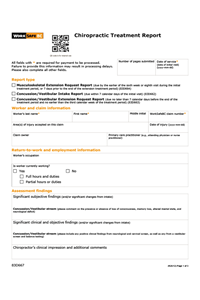
Chiropractic Treatment Report (Form 83D667)
Submit this form for musculoskeletal extension requests, concussion/vestibular intake, and concussion/vestibular extension requests.
Title

Chiropractor's Report (Form 8C/11C)
Form 8C is used for the Chiropractor’s First Report and Form 11C is used for the Chiropractor’s Discharge Report. Discharge reports (11C) must be submitted within seven days of the injured worker’s...
Title

Chiropractor's X-ray Report (Form 11RC)
An X-ray report is required only if X-rays are performed and the results are clinically relevant to the compensable injury.