
Newly registered
After your application for coverage is approved, your next steps are to add your WorkSafeBC account number to your online profile, report your payroll and pay premiums, and learn about your health and safety responsibilities as an employer.
- When to report payroll and pay premiums
- How to report payroll and pay premiums
- Getting the most out of your online services account
- How to get a clearance letter
- Your health and safety responsibilities
When to report payroll and pay premiums
To keep your account in good standing, you need to report your payroll and make payments on your premiums on time. The frequency depends on your business. Based on your payroll and classification unit, you’ll report your payroll and pay your premiums either:
- Once a year (premiums under $2,000 a year, paid every January).
- Quarterly (premiums are more than $2,000 a year, or if your classification requires mandatory quarterly reporting). See the dates for quarterly reporting and payment deadlines.
This helps match premiums payment schedules to the size and type of your business.
To check your payment schedule, log in and add your WorkSafeBC account number to your profile. Check your email address is current so you don’t miss reminder email notifications from us when it's time to report payroll and pay your premiums.
How to report payroll and pay premiums
The easiest and fastest way to report payroll and pay premiums is through your online services account.
Before you start, ensure you have the following information on hand:
- Your payroll records for the period you’re reporting on
- Total wages paid to employees, including pay to shareholders (e.g., dividends, bonuses, and draws are treated as earnings)
- Total payments to contractors and unregistered subcontractors for the year or quarter
- In some cases, you can subtract an equipment allowance from payments made to unregistered subcontractors
- Names of employees and active shareholders who earned more than the yearly earnings limit (the limit is shown on your form)
Once you sign up for your online services account, you become the account administrator and you can grant access to your account to a new or existing user. This may be convenient if you’d like a third party, such as a bookkeeper, accountant, or lawyer, to help you manage activities in your account.
Follow these step-by-step instructions for how you can grant permission to a third party.
An online services account is the easiest way for you to access helpful tools and save time in the future. But if you can't set one up, you can use Fast File & Pay to report your payroll and pay your premiums. This option is useful for accountants, bookkeepers, and payroll service providers who report and pay on behalf of their clients and don’t have access to their client’s online services account.
Report payroll and pay premiums using Fast File & Pay.
Getting the most out of your online services account
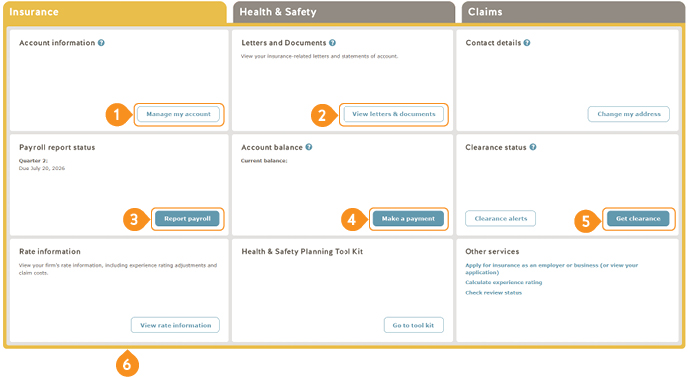
Once you log in to your online service account, go to the Insurance tab. This is where you can view and manage all your insurance-related account information.
-
1
Manage my account
Update your email address, contact information, and email communication preferences.
-
2
View letters and documents
When you receive an email notification, sign in to your account to view your statements, documents, and important account-related messages.
-
3
Report payroll
This takes you to a simple three-step process to report and pay.
-
4
Make a payment
Make a payment or update your payment method (e.g., add your credit card or direct debit information).
-
5
Get clearance
Apply for a clearance letter online.
-
6
View rate information
View your business’s past rates and claims costs all in one location.
There are also two other tabs in your online services account for Health & Safety and Claims.
The Health & Safety tab includes recent changes to regulations, guidelines, and policies, plus resources for workplace health and safety and access to reports on investigations and inspections.
On the Claims tab, you can start or manage a claim online, use the benefit wage rate calculator, view your claims cost report, and learn about WorkSafeBC Hire a Worker program.
How to get a clearance letter
A clearance letter shows that your business is registered with WorkSafeBC and is up to date on reporting payroll and paying its premiums. Prime contractors and businesses that hire contractors need a clearance letter to make sure the businesses they work with are in good standing.
To get a clearance letter, log in to your online services account and click Get clearance under the Insurance tab in the Clearance status section.
Learn more: Why do I need a clearance letter?
Your health and safety responsibilities
Everyone in the workplace has roles, rights, and responsibilities for workplace health and safety. As an employer, it’s important that you understand your own rights and responsibilities, as well as those of your employees. Fulfilling your health and safety responsibilities also protects your business and can keep your insurance rates stable.
We can help get you started. Learn what you need to do, and the steps to set up your basic health and safety program for your business. You can also review Health and Safety for Small Businesses: A guide to WorkSafeBC for an overview of your health and safety responsibilities.
Explore health and safety resources for your industry
We offer industry-specific information to help you create a safe and healthy workplace. Find resources and information for your industry.
Many businesses can also get support from an industry health and safety association (HSA) that works with WorkSafeBC.
HSAs provide trusted, industry-specific support based on industry expertise to help you keep your workplace healthy and safe. Look up the HSA for your industry or access an HSA health and safety talk for your industry:
Learn more
Now that your business is up and running, visit Grow and manage your business to learn:
- How to meet your responsibilities for workplace health and safety
- How your insurance premiums is calculated
- How to report a workplace injury or illness
- How managing an injured worker's return to work can help with their recovery and your premiums
Resources

Why Your Classification Unit Matters for Your Premium
This video explains what a classification unit (CU) is, how it is assigned, and why having the right classification helps ensure your premium reflects the work your business does.
Title
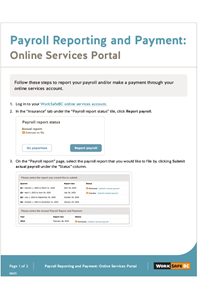
Payroll Reporting and Payment: Online Services Portal
Follow these steps to report your payroll and/or make a payment through your online services account.
Title
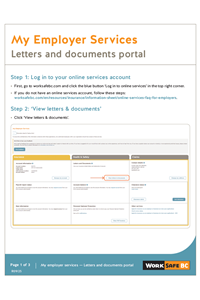
My Employer Services: Letters and documents portal
Instructions for employers to access to their online letters and documents in My Employer Services.
Title
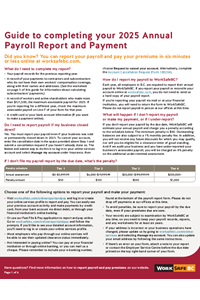
Annual Payroll Report and Payment: Guide
A guide to help employers report their payroll and pay their premiums using Form 1810.